Frequency Splitting with Effects
Frequency splitting divides a sound’s frequency spectrum into sections, allowing you to alter one section of the spectrum without changing the rest. It’s especially useful for sounds — like dubstep basslines — which include frequencies all across the spectrum.
Drop Ableton’s Audio Effects Rack plug-in onto a synth or sample. Click the “Chains” button, then drop three EQ plug-ins into the box that opens:
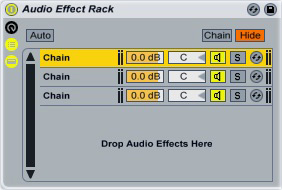
Set the first EQ to pass the lower frequencies through, set the second EQ to pass the mid-range, and set the last EQ to only allow high frequencies through (click the image for a larger version):

Now, if you want to apply an effect to a certain part of the frequency spectrum without affecting the rest of it, just drop it onto the relevant EQ. Let’s start by putting a Grain Delay plug-in on the high-end frequencies:
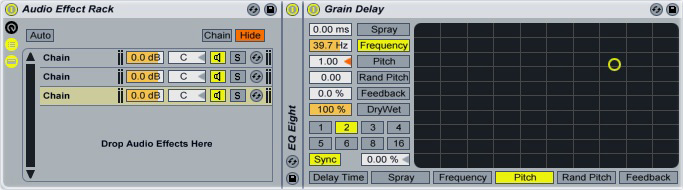
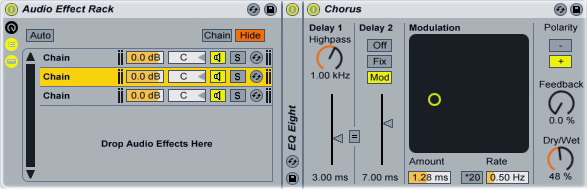
The delay will only affect the parts of the sound that fall above 1 kHz, leaving the rest unaltered. Now we can widen the middle part of the sound by dropping a chorus effect onto the second EQ:
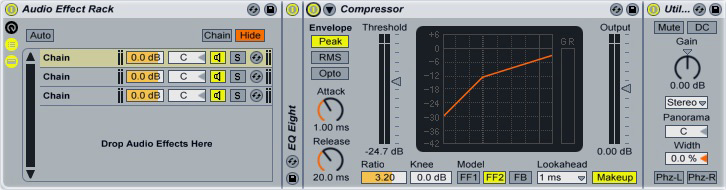
Finally, add a compressor to the low frequencies, then drop a Utility plug-in after it and lower its “Width” control to zero. This adds some low-end muscle to the sound and puts the low frequencies into mono:
Experiment with adding different effects and with shifting the frequency bands around. If you want the effects to be more subtle, move the Audio Effect Rack to a return channel, then send the source sound to the return.